
People Management
What is Timesheet Approval? Tips & Examples

Timesheet approval is an important but often frustrating part of shift planning. You don’t want to waste hours of your week sifting through numbers and logging each worker’s time. There are so many more productive things you could be doing.
If you’ve ever thought, “There’s got to be a better way to handle timesheet approval,” you’re right! You’ll learn the basics of timesheet approval and discover practical tips to eliminate common approval headaches.
Here are five things you need to know about timesheet approval:
- Timesheet approval involves verifying documented hours to ensure employees are paid fairly
- Timesheet mistakes can cause frustration and morale issues
- Poor time tracking strategies can expose your business to payroll fraud
- Developing a standardized process will help reduce errors and save time
- Payrolling software makes timesheet approval quick and easy while providing valuable labor cost insights
What is timesheet approval?
Timesheet approval is the process of reviewing and confirming an employee’s recorded work hours. During this process, a supervisor or manager ensures that a team member’s documented hours are accurate so they can be compensated accordingly.
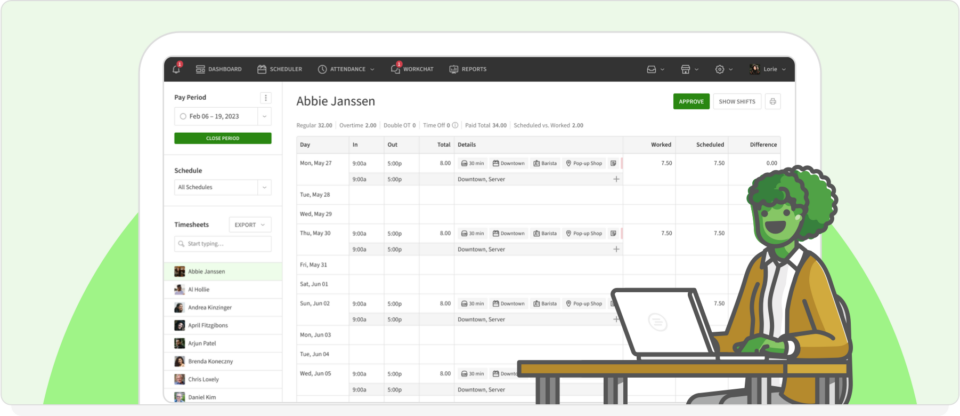
This process is a common business practice used to ensure compliance with labor laws and manage payroll. At the end of a pay period, each employee will submit their timesheet for review. You’ll compare it to their assigned shifts for the week and either approve or reject it.
If there’s a discrepancy, you can address it with the employee and fix the mistake before processing payroll. Timesheet approval helps catch errors before they impact a worker’s pay.
| Make timesheet approval easier than ever. Sign up for your free trial of When I Work today! |
What is the timesheet approval process?
The first step of the timesheet approval process involves the employee tracking their hours. They can do this using a spreadsheet or specialized software.

Employees record their start and end times for each workday. They also note any overtime hours or special projects they worked on. At the end of the pay period, they submit the document.
Next, you will review the submitted timesheet. You should compare the document to your schedule for that pay period and ensure that recorded hours match when an employee was supposed to be at work. If everything looks good, you can approve the timesheet. If not, speak with the employee to resolve the discrepancy.
Finally, you’ll forward the document to payroll. If you are using automated software, the entire process is electronic, so you can process payroll quickly.
Timesheet approval example
Suppose that you run a restaurant and are tracking hours manually. Your employee, John, tracks his work hours in a spreadsheet and emails it to you at the end of each week. You’ll review John’s hours, make sure they match his set schedule, approve the document, and process payroll so John gets fairly compensated on payday.
If you are using timesheet software like When I Work, the process will look similar, except everything will be more efficient.
In this scenario, John clocks in using the When I Work app. Once his shift ends, he clocks out, and the total hours for each day are automatically sent to your dashboard. This means you aren’t getting bombarded with emails from your entire team at the end of each week.
You’ll log into When I Work and review John’s hours. When I Work automatically compares claimed hours against scheduled shifts. It will even notify you of any discrepancies, such as John staying over two hours because of a late lunch rush. You can review the discrepancy and approve the extra hours.
Why is timesheet approval important?
The quality of your timesheet approval process will have a direct impact on your company’s financial health, employee morale, and business efficiency. Nearly half of workers say that getting paid late makes it “very difficult” for them to meet their financial obligations.
Don’t pay your staff late. Instead, revamp your timesheet approval process so that you can:
Ensure accurate time tracking
Accurate time tracking means recording the exact hours worked by each employee. This is important because it ensures your team gets paid for the time they put in.
Keep operational consistency
Your business practices must be consistent across all shifts. A steady approach to timesheet approval prevents confusion and ensures fairness.
Get insight into labor costs
Labor costs are your biggest expense. Therefore, you need to keep a close eye on them.
A time tracking tool like When I Work can provide detailed insights into how much you are spending in labor. You can pinpoint overages and better manage your team to reduce overtime expenses.
5 timesheet approval tips to accurately track employee time
Want to get better at timesheet approvals? Implement these useful tips:
1. Send out timed timesheet reminders
Send out weekly reminders to your team, prompting them to document their work hours. For example, you could set up weekly email reminders for employees to submit their documents by Friday afternoon. Sending these prompts reduces the chance of late submissions.
Don’t forget to set a reminder for yourself as well. If employees are submitting their sheets on Friday, you should tackle approvals that evening or the very next day. The sooner, the better.
2. Have a standard review process and timeline
Next, create a standard process for reviewing sheets. This ensures that you check every document the same way and within the same timeframe.
Create a checklist to follow when reviewing timesheets, ensuring you look for common errors like missing hours or incorrect entries. Set a timeline for yourself, such as reviewing documents within two days of receiving them.
Adopting a template can help you standardize time tracking across your entire workforce. You don’t have to waste hours building your own template. When I Work created a free employee timesheet template for Excel you can download.
3. Determine the best protocol for rejecting inaccurate or suspicious timesheets
It’s important to have clear policies for handling timesheets that include errors or seem suspicious. Suppose that one of your team members submits a timesheet showing hours on a day the employee was scheduled as off. However, their total hours for the week match your schedule.
This was probably an honest mistake and they simply entered time on the wrong day. Still, you need to investigate so you can get to the bottom of the problem. This way, the issue gets addressed fairly and promptly.
4. Keep your timesheet records organized
Maintain records of approved timesheets. Keeping digital copies of approved documents in a secure, organized folder makes it easy to retrieve them for audits and labor law compliance purposes.
You can also use past timesheet records to break down your quarterly or yearly overtime costs. Organize the data by individual employees or shifts to find out where all of your overtime costs originate.
5. Automate the timesheet approval process with employee scheduling software
Automating the timesheet approval process will save you a lot of headaches. The best tools can accommodate a wide range of custom schedule structures, including rotating shifts. This way, you can track hours worked and approve timesheets with ease.
All you have to do is input employee and shift data and list each person’s hourly rate. The software will do the rest.
Types of timesheet approval workflows
Depending on the size of your team and your company’s structure, you can choose from different ways to manage your timesheet reviews, including:
Manager approval
This is the most common approach, where a direct manager reviews, verifies, and signs off on employees’ submitted timesheets before sending them to payroll.
Multi-level approval
This is ideal for larger businesses or project-based work, where a timesheet needs to be reviewed by multiple people. For example, a project manager needs to review the hours first to verify them for the client account, followed by a general manager or HR to submit for final payroll.
Self-approval
Used for trusted, salaried employees or specific automated systems, this lets the employee’s submitted hours get automatically approved and sent to payroll without a manual review.
How When I Work makes timesheet approval a breeze
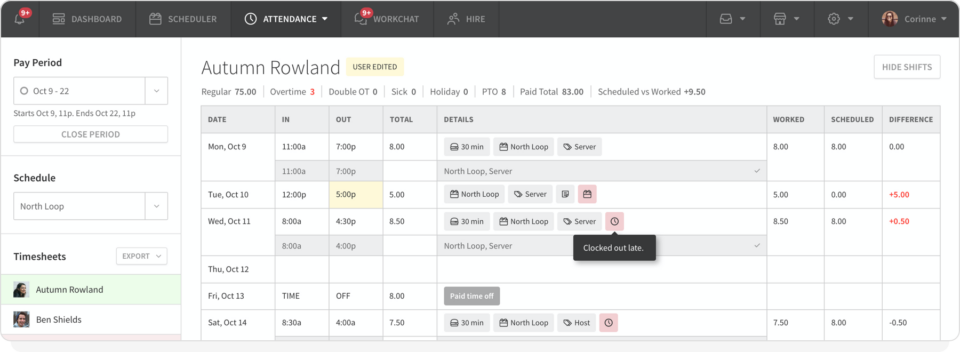
When I Work automatic scheduling software takes the hassle out of approving timesheets.
Once you’ve created your account and entered all relevant employee data, each user will be able to download the When I Work mobile app. They’ll use the app to clock in and track their hours. This data automatically gets uploaded to your platform so you can see everyone’s time at a glance.
When I Work also helps prevent errors. Our employee scheduling software has GPS functionality, which can ensure that people are actually on-site when they clock in. By promoting transparency, you can enjoy peace of mind knowing that the documented hours are accurate.
After you have everything set up, When I Work does all of the work of tracking timesheets and approving logged hours. If there’s an issue, such as someone entering overtime, you’ll get a push notification. You can review the extra hours claimed and keep an eye on any labor cost overages.
Take the guesswork and tedious manual labor out of timesheet approval. Simplify your life and make your business more efficient with When I Work.
Approve timesheets with ease using software from When I Work
Timesheet approval doesn’t have to be a recurring nightmare. With When I Work, you can approve timesheets fast, save time, and gain valuable insights into your labor expenses.
Our feature-laden tool has everything you need to manage your shifts.
The built-in time clock tracks hours and uploads the data to your interface. Our team messaging app gives employees a secure place to chat, connect with management, and swap shifts. No matter what scheduling challenges you are facing, When I Work can solve them.
Sign up for a free trial of When I Work and try out the software for yourself. Once you do, you’ll never want to plan your shifts without it.
Timesheet approval FAQs
Q: What is timesheet approval?
A: Timesheet approval is the process where a manager reviews and confirms each employee’s recorded work hours to make sure they’re accurate and the employee gets paid fairly.
Q: What is the process of approving timesheets?
A: The process of timesheet approval consists of employees tracking and submitting their hours, managers reviewing and comparing those hours to the assigned schedule to resolve discrepancies, and then forwarding the approved file to a payroll provider.
Q: Who should approve timesheets?
A: Timesheets should be approved by a supervisor or manager who checks the document against the schedule.
Q: What happens if a timesheet is not approved?
A: If a timesheet is not approved because of a discrepancy, the manager should address the issue and fix it with the employee before processing payroll. If the manager delays approving the entire payroll document, it can cause late payroll delivery and delayed paychecks for the whole team.