People Management
What Is Workforce Management (WFM)? The Complete Guide for Businesses

| Quick Answer: Workforce management (WFM) is the set of tools and processes businesses use to plan, schedule, and track hourly labor. A WFM system covers labor forecasting, scheduling, time and attendance, employee availability, compliance, and team communication. |
You finished next week’s schedule on Thursday night and felt good about it. By Monday morning, a server has called in sick and a host wants to swap Friday’s close. Workforce management, or WFM for short, solves that exact reshuffling problem.
The term “workforce management” refers to the set of tools and processes that help businesses ensure the right people are in the right roles at the right time, consistently. Call centers pioneered these methods because managers needed to determine the ideal number of hourly workers to match incoming call demand.
Today, restaurants, retail stores, clinics, and other shift-based businesses use WFM to balance labor costs against customer demand. And the same principles apply whether you plan staffing in a spreadsheet or in dedicated software.
Table of contents
- How does WFM work? 6 essential pillars of an effective system
- Workforce management vs. workforce optimization
- What are the benefits of workforce management?
- Workforce management vs. employee scheduling
- What are the features you need in a workforce management solution?
- All-in-one forecasting, scheduling, and time tracking with When I Work
- FAQ
How does WFM work? 6 essential pillars of an effective system
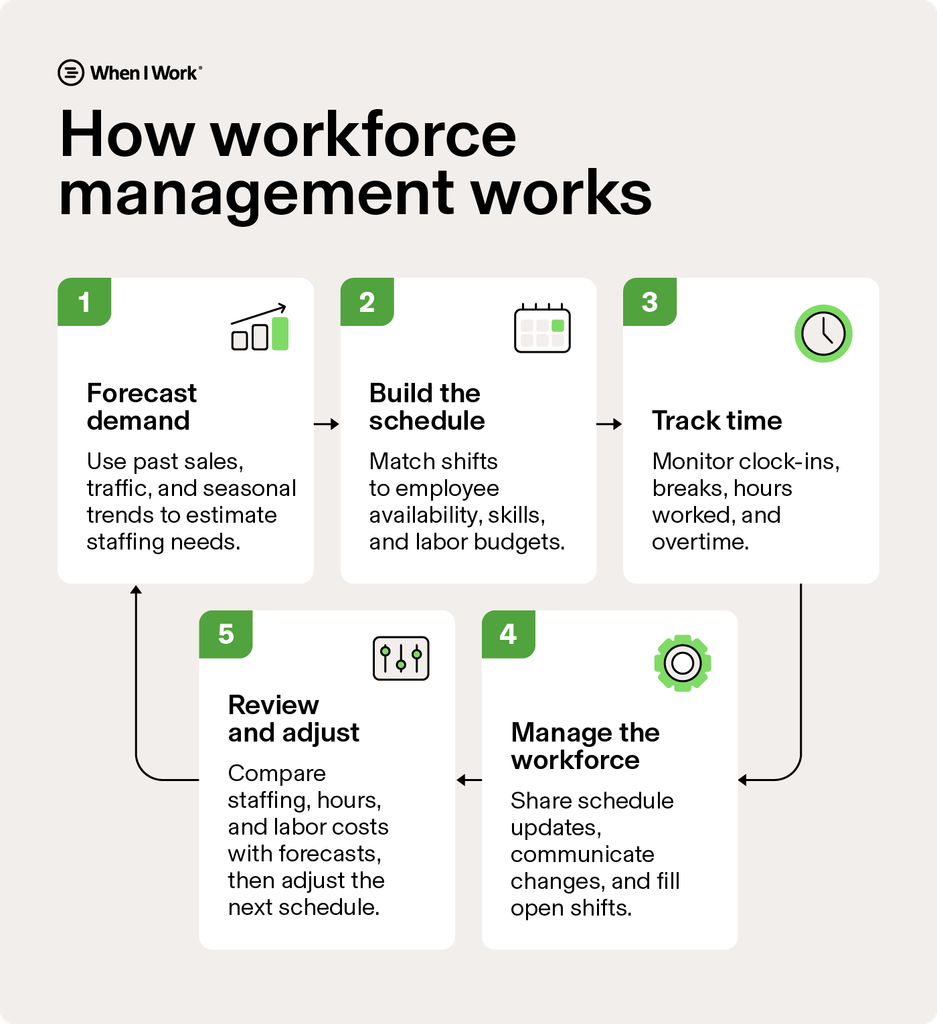
Successful workforce management involves six key areas:
- Forecasting and budgeting
- Scheduling
- Timekeeping and attendance
- Employee availability and engagement
- Compliance and labor law tracking
- Team communication
The workforce management examples below show what each one looks like in a real business.
1. Forecasting and budgeting
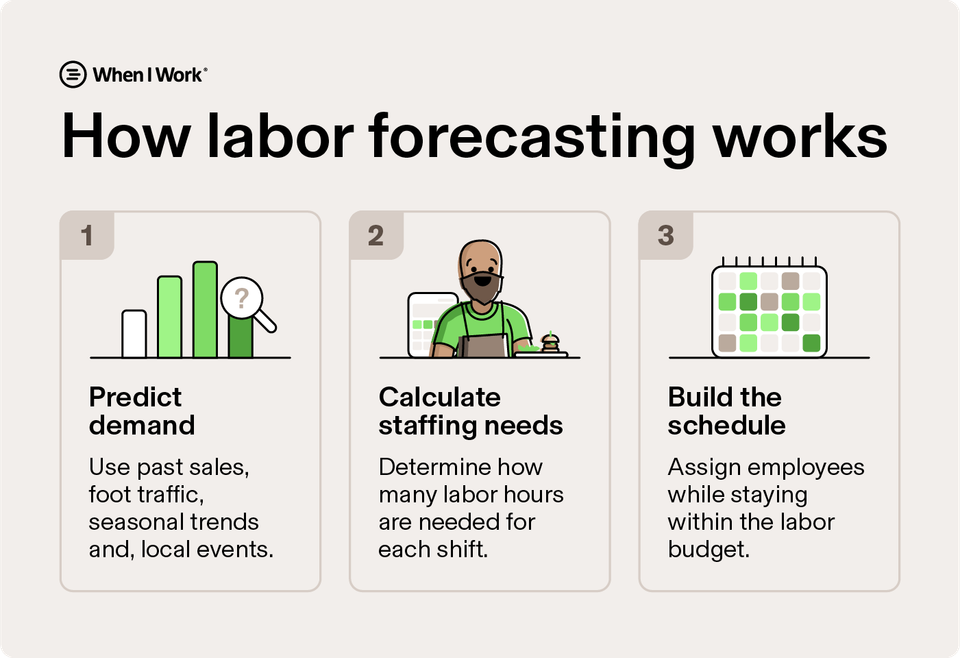
To build a workable schedule, you have to know how many people and what skills your business requires at a given time. That means weighing your labor budget against expected customer demand.
For example, if your summer busy season is fast approaching, you’ll need to start forecasting to determine how many seasonal employees your business will need.
You’re a café owner, and you notice Saturday morning sales have climbed every spring for the last two years.
To handle the surge that first year, you had to scramble to get an extra barista on the schedule. Absolute chaos. Then, hoping to put less pressure on your staff, you overscheduled the second year.
That’s historical data you can use to forecast labor needs and prepare for future rushes.
The goal for this spring is to balance sales and service without overworking your staff or causing labor costs to skyrocket. You add a barista to those busy Saturdays and trim an hour from slow Tuesday afternoons.
Labor forecasting software does that math for you, comparing scheduled hours against projected demand and flagging overstaffing before the week starts.
2. Scheduling
If you’ve ever built a schedule from scratch, you know how time-consuming manual scheduling can be. Employee scheduling software accounts for availability, time-off requests, and past attendance, then lets employees weigh in before the schedule goes out.
Common scheduling features include:
- Auto-scheduling: Automated scheduling builds shifts based on availability, skills, and labor needs.
- Shift swaps: Employees can trade shifts with manager approval, so managers don’t have to coordinate swaps manually.
- Open shifts: Managers post unfilled shifts, and qualified employees claim them from their phones.
Example: When a line cook at a restaurant calls out on a Friday night, the manager posts an open shift. Another cook picks it up from their phone, and the manager skips the round of calls.
3. Timekeeping and attendance
Workforce management also covers what happens after you publish the schedule: who shows up on time, who misses shifts, and who’s on the clock right now. A time clock app lets employees clock in from their phones, and some use GPS or geofencing to limit clock-ins to approved locations. Photo verification helps prevent buddy punching, where one employee clocks in for another.
Time data like that also feeds payroll. Timesheet software turns clock-ins into approved timesheets, and payroll integrations send those hours to your payroll provider without anyone retyping them.
Example: A home care agency’s caregivers clock in by GPS at each client visit, giving the office a record of when and where each shift started.
4. Employee availability and satisfaction
Every schedule depends on who can actually work. WFM tracks each employee’s availability, time-off requests, and shift preferences, so managers build schedules people can keep.
Schedule control is a gap for many employers. In Gallup’s 2025 American Job Quality Study, 41% of U.S. employees reported having little or no control over their work schedules, and workers with low-quality schedules reported lower job satisfaction. Self scheduling, shift swaps, and quick time-off approvals give employees more say in when they work.
Attendance data helps here, too. Clock-in records show who’s consistently on time and who’s missing shifts, so you can recognize reliable employees and address attendance problems early.
Example: A fitness studio manager posts next weekend’s open shifts on a Thursday afternoon. Instructions claim them from their phones by Friday, and nobody needs to be talked into taking a Sunday shift.
5. Compliance and labor law tracking
Labor laws cover overtime, breaks, hours for minors, and, in some cities, how far in advance you must post schedules. Breaking one rule can lead to fines, back pay, or lawsuits. WFM software with compliance features can help lower that risk by flagging potential problems before they happen.
Common compliance features include overtime alerts that warn you when someone is close to 40 hours and break reminders for state meal and rest rules.
Accurate time records also give you an audit trail if a wage claim ever comes up. Some platforms offer dedicated tools for labor law compliance and overtime tracking that run in the background.
Example: A retail store owner gets an overtime alert for a cashier who’s about to pass 40 hours. They moved that cashier’s Saturday shift to a part-time employee and stayed on budget.
6. Team communication
Communication keeps the schedule working day to day. When teams rely on personal texts, group chats, and phone calls, messages get lost and people miss shifts. Employees also end up sharing personal phone numbers with coworkers just to stay in touch.
A team messaging app puts shift updates, announcements, and direct messages where employees already check their schedules. Everyone sees schedule changes in one place.
Example: A hotel front desk manager posts one announcement about Saturday’s deep clean. Everyone scheduled that day sees it in the same app where they check their shifts, so nobody shows up expecting a normal open.
Workforce management vs. workforce optimization
WFM handles day-to-day operations like forecasting, scheduling, and time tracking. Workforce optimization is a broader strategy that uses that data, along with training, quality reviews, and analytics, to improve performance over time.
For example, a manager might review past coverage gaps, overtime, and call-outs to fine-tune how they build future schedules.
| Workforce management | Workforce optimization | |
| Focus | Day-to-day staffing and labor tracking | Improving quality, performance, and customer experience |
| Scope | Forecasting, scheduling, time and attendance, availability, compliance, and communication | Workforce management plus training, quality checks, and analytics |
| Example | Filling a Friday call-out in minutes | Using months of shift data to redesign staffing for peak seasons |
What are the benefits of workforce management?
Businesses with strong workforce management often have both happier employees and higher profitability. The main benefits can be broken down as follows:
- Lower labor costs: Staffing tracks real demand, so you pay for fewer idle hours and less unplanned overtime.
- Better shift coverage: Open shifts and swaps fill gaps before you run short-staffed.
- Fewer no-shows: Shift reminders and a shared schedule make it harder for shifts to slip through the cracks.
- Less admin time: Digital timesheets and auto-scheduling replace spreadsheets and paper, which frees managers to coach their teams.
- Fewer compliance risks: Break reminders, overtime alerts, and time records help you follow wage and hour laws.
- Better retention: Employees who control their schedules are more likely to stay.
Workforce management vs. employee scheduling
Employee scheduling is the process of deciding who works when. Workforce management is the bigger picture that scheduling falls under. WFM systems give you get a real-time view of your labor resources, enabling you to continuously and holistically optimize business and people management processes, including scheduling.
Say you own a coffee shop. With one location, a basic scheduling app can cover you. Open a second one, and you can’t stand on both floors, so guessing at staffing stops working, and that’s where a workforce management system comes in.
WFM systems can pull last year’s sales to project what each of your locations actually needs, week by week. They can also put sales and labor hours side by side for each location, so you can ensure full coverage without overspending on either.
Once you implement your WFM system, establishing a few best practices early on—such as defining who approves shift swaps and how far in advance managers post schedules—helps keep both locations running smoothly.
What are the features you need in a workforce management solution?
The right workforce management software should reduce the manual work involved in scheduling, time tracking, and managing labor. Prioritize these core features:
- Scheduling: Build shifts around employee availability, skills, and coverage needs.
- Time tracking: Capture clock-ins, breaks, and hours with tools such as GPS or geofencing.
- Labor forecasting: Match staffing levels to expected demand and monitor labor costs.
- Shift management: Let employees request time off, swap shifts, and pick up open shifts.
- Payroll integration: Send approved hours to payroll without manual data entry.
- Compliance alerts: Flag overtime, missed breaks, and other issues before they become problems.
- Mobile access: Give managers and employees access to schedules, time tracking, and updates from their phones.
All-in-one forecasting, scheduling, and time tracking with When I Work
When I Work brings labor forecasting, auto-scheduling, time tracking, and team messaging together on one platform. That’s hours back in your week that you can spend growing your business (like hiring new employees or working on a new product or location launch) rather than piecing together schedules.
Customers report saving up to 15 hours per week on scheduling, and plans start at $2.50 per user per month. Start your 14-day free trial and see how it works for your team.
FAQ
What is the best workforce management software for small businesses?
The best workforce management software for a small business should cover core needs without adding unnecessary complexity or administrative work.
When I Work is a strong option for small businesses with hourly teams because it combines scheduling, time tracking, labor forecasting, and team messaging in one platform. Employees manage availability, request time off, and swap shifts on their own without needing manager input or assistance.
What is workforce management software?
Workforce management software helps businesses plan and manage hourly labor. Common features include employee scheduling, time tracking, labor forecasting, shift management, and payroll integrations.
What is the difference between HR and workforce management?
HR manages the broader employee lifecycle, including hiring, onboarding, benefits, performance, and employee records. Workforce management focuses on deploying employees efficiently, including scheduling, time tracking, staffing, and labor costs.
Is workforce management a part of HR?
Yes. Organizations often treat workforce management as a function of HR, but WFM focuses specifically on managing employee time, staffing, schedules, and labor needs. WFM software can also connect with payroll, HR, and other business systems.
What does WFM stand for?
WFM stands for workforce management. It refers to the processes and software businesses use to plan staffing, schedules, employee hours, and labor needs.