Scheduling Strategy
Homebase Vs Sling (2026): Which Scheduling App Wins?

If you’re comparing Homebase vs Sling, you’re probably trying to solve a very specific problem. You need to get off spreadsheets, stop chasing people via text, or get a schedule out without turning Sunday night into unpaid admin.
At first glance, Homebase and Sling look very similar. Both offer free entry points, and both help small teams publish schedules digitally.
That’s exactly why this comparison matters.
Homebase leans toward a broader small-business platform, combining scheduling with hiring tools and an optional payroll add-on. Sling stays closer to lightweight scheduling, with a generous free plan but deeper reporting and management tools reserved for higher tiers. Homebase’s Basic plan is free for one location and up to 10 employees, while Sling offers free scheduling for up to 30 users, but in both cases, the limitations become clearer as soon as you need more control, visibility, or flexibility.
And that’s where When I Work becomes a useful benchmark.
Because if you’re looking for software that actually reduces manual scheduling work, improves accountability, and connects cleanly with your payroll workflow, it helps to compare both tools against a platform built specifically for managing shift-based teams.
The Homebase vs Sling decision framework
Both Homebase and Sling can get you off paper, but that doesn’t mean they solve the same problem equally well. Comparing both against When I Work helps show whether you’re choosing a starter app or something built to reduce manual scheduling work day after day.
Choose Homebase if
You run a single-location business with a small team, like the idea of scheduling alongside hiring and HR tools, and don’t mind adding payroll as a separate paid service if you want everything managed in one platform.
Choose Sling if
You want a simple scheduling tool with a generous free plan, your shifts are fairly predictable, and you’re comfortable handling more of the scheduling logic yourself using templates and manual adjustments.
Keep When I Work in mind if
You want the comparison to go beyond the entry price. When I Work is the better benchmark for teams that care about auto-scheduling, labor visibility, stronger clock-in accountability, and scheduling tools that don’t need to be unlocked later.
Comparison overview: Where they differ at a glance
To understand how these platforms actually perform day to day, you need to look at how they handle the three areas managers deal with constantly—scheduling logic, time-tracking accountability, and payroll workflows. Entry price matters, but it rarely tells the full story once schedules start changing in real time.
| Homebase | Sling | When I Work | |
| Best for | Small single-location teams wanting scheduling plus HR tools and optional payroll | Small teams wanting free scheduling for up to 30 users | Managers who want scheduling, accountability, and labor visibility in one place |
| Free plan | Basic plan for one location, up to 10 employees | Free core scheduling for up to 30 users | 14-day full-access trial |
| Scheduling style | Drag-and-drop scheduling | Template-heavy scheduling | Rule-based auto-scheduling |
| Time tracking | GPS time clock and break tracking | Geofencing and paid time-tracking tiers | GPS and optional photo identity verification |
| Payroll approach | Payroll available as a paid add-on ($39/mo plus $6/user) | Export-based workflow with advanced reporting on top tier | Direct payroll integrations (Rippling, ADP, Gusto, QuickBooks, and more) |
| Messaging | Built-in team messaging (feature access varies by plan) | Messaging included, with more limited overall tool depth | WorkChat included across plans. |
When Homebase makes more sense
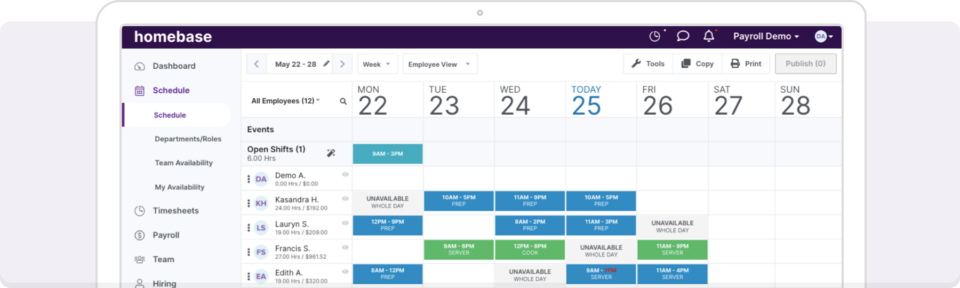
Source: Homebase
If you’re running one location, keeping things fairly simple, and you like the idea of scheduling alongside hiring and HR tools in a single platform, Homebase can be a perfectly sensible choice. Its free entry point is attractive, and for very small hourly teams, it can be enough to replace the whiteboard, the paper schedule, and the manager’s group text habit.
Not every team needs a more advanced system on day one.
Homebase may also appeal if you prefer keeping scheduling, hiring tools, and payroll services under one brand. Just keep in mind that Homebase payroll is offered as a paid add-on, not included in the free or standard scheduling plans.
When Sling makes more sense
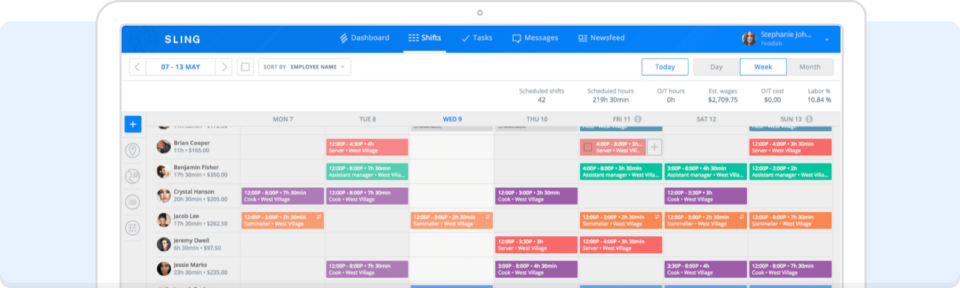
Source: Getsling
Sling’s free plan is one of the most generous in this category, and for small businesses that just want a digital scheduling app without much setup difficulty, it can do the job. Sling’s pricing model is straightforward, with free core scheduling for up to 30 users, while paid tiers add time tracking, reporting, and additional management tools.
If your team has fairly stable shifts and you’re comfortable using templates, Sling can feel lightweight in a good way.
The trade-off is that lightweight tools often require more manual oversight. As schedules become more complex, with changing availability, shift swaps, or overtime risks, managers may find themselves spending more time adjusting schedules by hand.
What Homebase is really selling
Homebase isn’t positioned purely as a scheduling app. It’s designed as a broader small-business operations platform.
That’s why the appeal is obvious for small cafés, retail shops, and service businesses. Scheduling sits alongside hiring tools, onboarding workflows, and optional payroll services. If you prefer having several operational tools under one vendor and login, that bundled approach can feel convenient.
The trade-off is that Homebase often prioritizes breadth over scheduling depth.
So the real question isn’t whether it can publish a schedule. It can. The question is whether it provides the level of control, visibility, and automation managers need once schedules start changing in real time.
What Sling is really selling
Sling’s positioning is built around simplicity and low-cost entry. It’s the tool many teams choose when their first goal is simply getting off spreadsheets and into a digital scheduling app. The generous free plan makes that transition easy, especially for small teams with predictable schedules.
But compared with more advanced scheduling platforms, Sling can feel closer to a digital planner than a true scheduling engine. That’s the dividing line.
If you mainly want a tool to publish schedules, Sling works well. But if you want software that helps build the schedule for you, reduce manual adjustments, and surface labor issues before they happen, the platform can start to feel limited.
Why When I Work matters in this comparison
Most Homebase vs Sling comparisons stop at listing features. They compare two entry-level tools and treat the differences as the full picture. But for managers responsible for coverage, labor costs, and payroll accuracy, that’s not usually enough.
Because if both platforms can publish a schedule, the more important question becomes: what does a stronger scheduling system actually change in your day-to-day operations?
That’s where When I Work becomes useful as a comparison.
It’s designed specifically for shift-based teams and focuses on reducing the manual work managers deal with every week. It’s the benchmark for features like:
- Rule-based auto-scheduling
- Labor visibility before publishing
- Optional photo identity verification at clock in
- Scheduling, team messaging, and time tracking are tied together
- Payroll integrations without forcing a bundled payroll product
So even when you’re choosing between Homebase and Sling, it’s useful to compare both against a platform built to do more than just publish the schedule.
Employee scheduling comparison: Drag-and-drop vs templates vs automation
Most managers buy scheduling software because someone always calls in sick, someone always forgets the schedule, and someone always ends up edging into overtime without anyone noticing until payroll.
That’s where the three products separate.
Homebase: Straightforward drag-and-drop scheduling
Homebase gives you a scheduling interface that feels approachable. You can build and edit shifts quickly, and for small teams, that’s often enough. Its strength is its usability.
For managers who just want a digital version of the schedule board, that’s a real advantage.
Sling: Template-based scheduling for simple repeat patterns
Sling leans harder into templates. If the week repeats itself closely enough, that’s efficient. If it doesn’t, the manager is still doing a lot of the thinking. That’s the catch with Sling. It saves time compared to paper, but it doesn’t reduce the scheduling burden much when shifts, availability, or coverage needs start changing.
When I Work: The benchmark for auto-scheduling
This is where When I Work changes the terms of the comparison. Instead of relying mainly on drag-and-drop or copied templates, it uses rule-based auto-scheduling to match shifts against availability, roles, and configured limits. That means the software is helping build the schedule, not just displaying it. So even in a Homebase vs Sling conversation, When I Work is the reference point for what less manual scheduling actually looks like.
Time tracking and accountability: Basic capture vs stronger controls
Most scheduling apps include a time clock, but simply recording when someone taps “clock in” doesn’t always mean the right person is actually starting the shift. For managers responsible for payroll accuracy and labor costs, the difference between basic time tracking and stronger shift accountability can matter more than any other platform feature.
Sling
Sling offers geofencing and time tracking in paid tiers. That’s useful, but still fairly basic. It can tell you where the device is, not necessarily who’s holding it.
Homebase
Homebase also offers GPS-based time tracking and break tools as part of its time-and-attendance pitch. That’s solid for general small-business use.
When I Work
When I Work sets the stronger benchmark here with optional photo verification at clock-in. Homebase and Sling tell you where the phone is, but When I Work has optional photo verification that tells you who is holding it. This prevents the “buddy punching” that drains 2-5% of payroll in many hourly businesses. That feature alone changes the standard of comparison.
Payroll comparison: Built-in payroll vs exports vs integration flexibility
This is probably the clearest structural difference between Homebase and Sling.
Homebase: The add-on payroll route
Homebase promotes payroll as part of its broader workforce platform, but it’s important to understand how it’s actually priced. Payroll is not included in the free Basic plan or the standard scheduling tiers. Instead, it’s offered as an additional service that costs $39 per month plus $6 per paid employee.
For some small businesses, that convenience can be appealing. Running payroll inside the same system that manages schedules and time tracking can simplify administration.
Businesses that already use a payroll provider may also find themselves paying for tools they don’t need, or feeling pressure to move payroll into the Homebase ecosystem to keep everything aligned.
Sling: Export-first payroll workflow
Sling handles payroll more lightly than Homebase and more manually than When I Work. Core scheduling may be free, but the deeper reporting most managers need for payroll checks sits on the Business plan, while lower tiers rely more on basic timesheets and exports.
That means Sling can work if you’re comfortable moving payroll data around yourself. But if you want stronger payroll visibility without stepping up to the highest tier, the low starting price can stop looking quite so cheap.
When I Work: Payroll flexibility as the benchmark
When I Work takes a different approach. Instead of bundling payroll into a single product, it connects employee scheduling and time tracking directly with the payroll providers many businesses already use.
When I Work has a preferred partnership with Rippling, giving teams an easy connection between scheduling, time tracking, and payroll. At the same time, the platform integrates with widely used providers such as ADP, Gusto, QuickBooks, and other major payroll systems.
For managers, the advantage is flexibility. You can keep the payroll provider your business already trusts while automatically sending approved timesheets and hours directly into payroll. There’s no need to migrate systems or manage duplicate data across platforms.
That’s why When I Work matters in this comparison. It highlights the difference between payroll bundled inside a scheduling tool and a platform designed to work alongside the payroll systems businesses already rely on.
Pricing: Free-plan appeal vs actual day-to-day value
This is where comparison articles just say “Sling is cheaper” or “Homebase has payroll.” The real question is what happens when your team needs the everyday tools managers rely on, like scheduling automation, payroll visibility, and reliable reporting.
Sling pricing
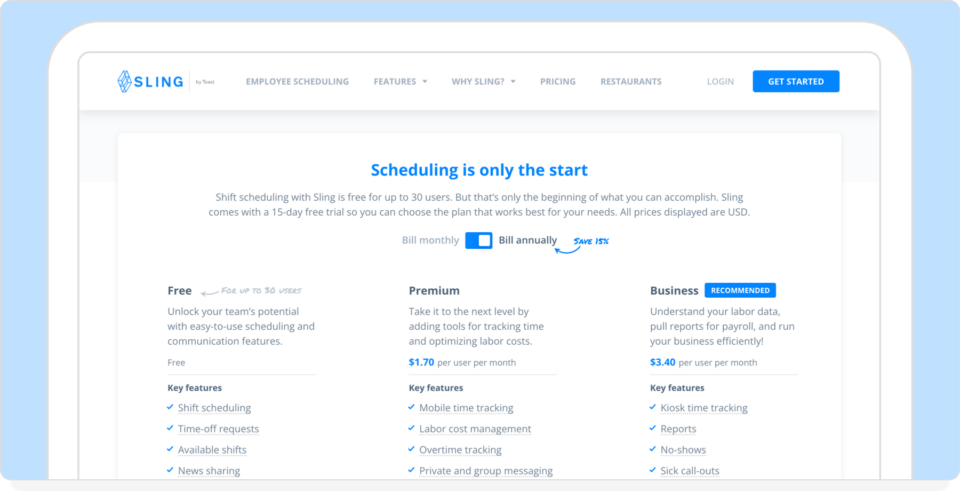
Source: Getsling Pricing
Sling’s pricing page makes a very clear offer:
- Free for up to 30 users
- Premium from $1.70 per user
- Business from $3.40 per user
At first glance, that looks extremely affordable. For small teams that mainly need a digital schedule and basic shift planning, Sling’s free tier can be enough to move away from spreadsheets.
However, many of the labor reporting tools managers rely on for payroll review and operational visibility are reserved for the Business plan, the highest tier.
So while Sling’s entry price is attractive, the real cost often depends on how much visibility you need into labor data.
Homebase pricing
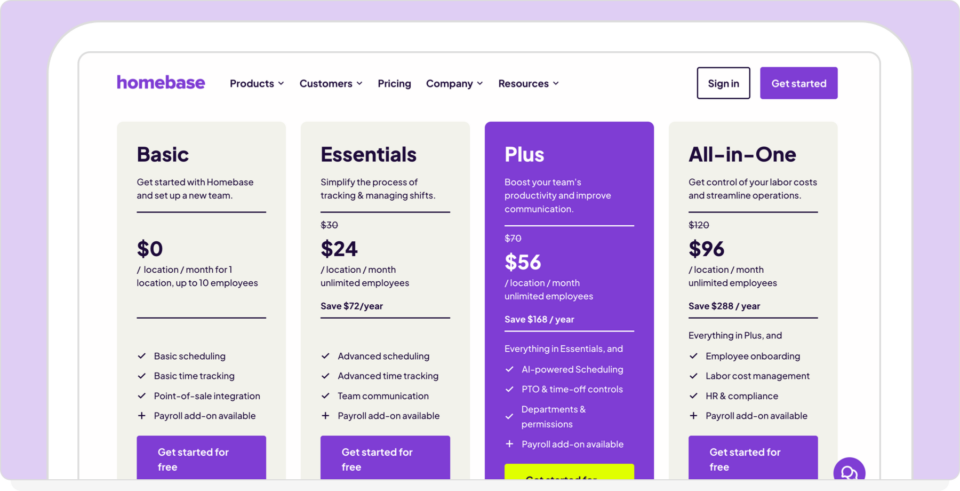
Source: Homebase Pricing
Homebase takes a different approach. Its Basic plan is free, but it’s limited to one location and up to 10 employees. Businesses need to move into paid plans to unlock broader scheduling, reporting, and workforce tools.
It’s also important to note that Homebase payroll is not included in any of its plans. Payroll is offered as a separate add-on priced at:
$39 per month, plus $6 per paid employee per month
For very small teams, this may be convenient, but the additional payroll fee can become one of the larger software costs.
Why When I Work changes the pricing conversation
When I Work approaches the problem from a different direction. Instead of focusing on the lowest entry price, the platform focuses on reducing the operational workload managers face every week. Things like scheduling adjustments, overtime surprises, and back-and-forth communication about shift coverage.
Features like auto-scheduling, availability management, team messaging, and labor forecasting are included across plans, so managers don’t have to upgrade simply to access the tools they rely on every day. You can simply choose your plan based on how you operate and whether you’re managing a single schedule or multiple locations.
The result is that pricing becomes less about the cheapest starting point and more about how much time the platform saves while keeping labor costs under control.
Which app is best for you?
Homebase, Sling, and When I Work are all credible tools, but they’re designed for slightly different types of teams. The right choice depends on how complex your scheduling needs are and how much automation you want built into your workflow.
Stick with Homebase if:
You want scheduling and basic time-tracking in the same system, you run a small operation, and simplicity matters more than scheduling depth.
Stick with Sling if:
You want a generous free plan, your schedules are fairly repeatable, and you’re happy managing more of the logic yourself.
Look at When I Work if:
You want auto-scheduling to reduce the time spent building schedules, or you need stronger shift accountability and clock-in verification. When I Work is the better option if you want scheduling, time tracking, and messaging connected in one system, or flexible payroll integrations with providers like Rippling, ADP, Gusto, or QuickBooks
For many managers, the difference comes down to whether the software simply publishes a schedule or actually helps run the workforce.
Homebase vs Sling: Frequently asked questions
Choosing between scheduling platforms usually comes down to practical concerns. Pricing, payroll handling, automation, and how much manual coordination the system removes from your day-to-day operations. These are some of the most common questions managers ask when comparing Homebase, Sling, and When I Work.
Is Homebase better than Sling?
It depends on what you need from the platform. Homebase is stronger if you want a broader small-business platform that includes hiring tools and optional payroll services. Sling is typically the simpler option if your main goal is low-cost scheduling for a small team.
Is Sling really free?
Yes. Sling offers a free plan for up to 30 users that includes basic scheduling functionality. However, many of the reporting and management tools are only available on the higher-priced Business tier.
Does Homebase include payroll?
No. Payroll is not included in the Homebase free or standard scheduling plans. It is offered as an add-on service priced at $39 per month, plus $6 per employee paid.
How does When I Work compare to Homebase and Sling?
When I Work focuses specifically on workforce scheduling, time tracking, and team coordination. Instead of bundling HR tools or relying heavily on manual scheduling templates, it emphasizes automation, labor visibility, and accountability features designed to help managers spend less time adjusting schedules.
Which tool is best for shift-heavy teams?
If schedules change frequently, open shifts need to be filled quickly, and managers need to stay ahead of overtime, When I Work is a better standard to compare against. Between Homebase and Sling alone, Homebase is broader, and Sling is simpler.
The verdict
Homebase and Sling are both credible scheduling tools. Homebase leans toward an all-in-one small-business platform, while Sling focuses on simple scheduling with a low entry price. For many small teams, either option can be a step up from spreadsheets and paper schedules.
But once scheduling becomes more complex, with multiple shifts, changing availability, overtime concerns, and payroll coordination, the limitations of basic scheduling tools become more noticeable.
That’s where When I Work stands apart.
Instead of acting primarily as a digital calendar, it’s designed to help managers build schedules faster, maintain accountability across shifts, and keep labor costs visible as schedules are being created.
For teams that want more than just a place to publish the schedule, that difference becomes clear very quickly.
You can see for yourself today. Start your 14-day free trial of When I Work, and start making your workforce management easier than ever.
Disclaimer: This comparison is based on publicly available information and product documentation at the time of writing. Features, pricing, and functionality may change over time. While we aim to present accurate and up-to-date information, we recommend reviewing each provider’s official website for the most current details.